

We all know liquid and electronics don't mix and many of us have experienced that heart stopping moment when a glass of wine, water or coffee has spilled over or into our precious laptop or device or have discovered a drenched and sad looking gadget in our back pack after a water bottle has leaked.

While it can be tempting to keep using your device should it still turn on or try some of the online advice instructing you to place your device in a bed of rice or warm location to dry it out, this post is here to explain why these suggestions are not great ideas and in fact can do more harm than good.
Common Pit-falls and Traps
A common surprise that people face is that your device may indeed dry out enough to function normally which can give a false impression the device is undamaged when in reality the reverse is true. Corrosion has most likely begun a damaging rampage on the delicate components and traces (the printed links etched on modern PCB printed circuit boards used in modern electronics used to link and connect various components into a circuit) or under the chips (BGA) components none of which is good.
The liquid type can have an affect on the amount of corrosion with wine and sugar drinks being worse however water will also cause damage due to the impurities in the water ltself.
From our experience it is important to completely assess the main board under a microscope , clean and assess any serious corrosion or components that require replacement and repair any damaged traces or pads to completely repair as well as other affected components such as keyboards , track pads and battery modules.
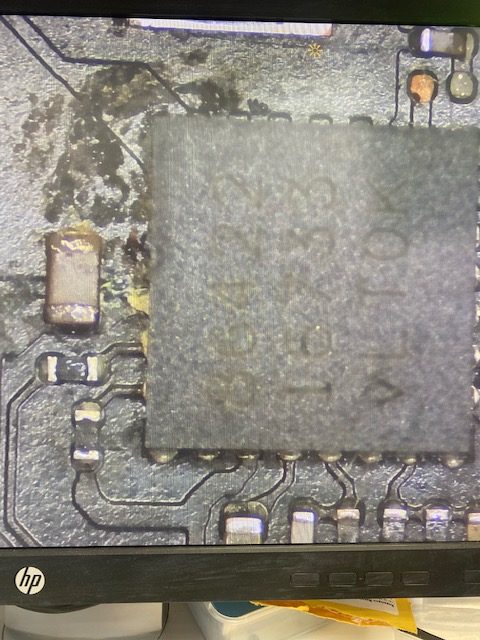
As you can see from the image here, this BGA chip has gunk and corrosion under the chip itself. This not something that can be cleaned easily so we would typically remove the chip completely and assess any damage under it.
In many cases the pads under the chip will be damaged beyond repair so running a jumper wire and understanding the circuit in question is essential to completely repair.
This type of corrosion can take anywhere from hours to months to begin causing issues so this is a major part in why this type of damage is misdiagnosed by the end user and in a lot of cases computer techniciains as well.
A very common issue is to miss damage under larger BGA components and also to other connected flex cables that connect other components such as track pads , keyboards USB boards and battery modules. Taking clear images under a microscope before cleaning is very important as there are many clues to be found by the tell tale signs of liquid damage.
How much is too much damage?
This really depends on the extent of the damage, where the liquid has reached inside the device and the make and model of laptop so we offer a free assessment where possible and a cost effective one should advanced troubleshooting be required. Should major disassembly be required to diagnose an $85+GST fee will apply which is absorbed into the final price should you choose to proceed after a quote is provided. This fee is payable if you choose not to proceed or we find there is too much damage to repair cost effectively.
Other Challenges
Many laptop and device manufacturers are no longer designing products with removable storage devices making data recovery difficult should liquid damage render the device unusable. We have a few tricks and tools that can recover data from integrated storage devices in a range of products so all is not lost should your device not be cost effective to completely repair but you require data recovered.
OK the spill has just occured so what SHOULD you do?
- Turn off your device right away , if the device does not respond press and hold the power button until it powers off. The power off proceedure is a little bit different for tablets and does vary from device to device.
- Unplug the power adaptor this is a must do!
- Remove the battery. Newer laptops tablets and phones may not have removable batteries however if your device does remove it where possible.
- Remove any visible liquid from the device with a dry cloth or paper towel.
- Book it in with us for an assessment
What NOT to do
- Don't place your device in rice - This does nothing to help remove the liquid and corrosion just wastes rice!
- Don't place your device in the hot water cupboard - Aside from drying things out a little it won't help long term and it could make things worse.
- Don't try to turn it on until it has been checked - It can cause difficult to repair damage if something is shorted by the liquid damage or corrosion
Our advice - Have your device assessed as quickly as possible following any liquid spill regardless of how much liquid has entered your device.
Written By Mark Duff
Don't Wait
Trust Us - Have your device assessed for free* and repaired profesionally to avoid more damage and data loss.
* Unlike other companies we try to keep assessments free however any major disassembly or diagnosis will incur a modest fee which is abosorbed into the final price if repairable.